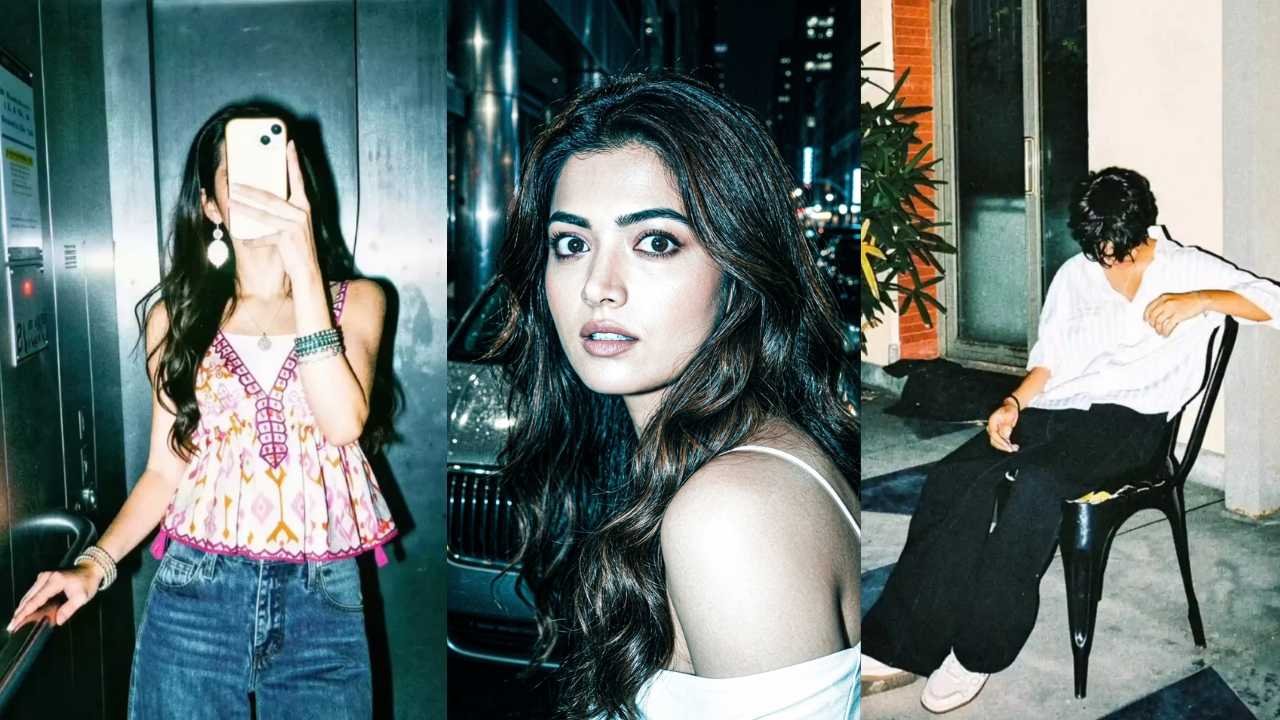
The Flash Filter aesthetic is dominating Instagram feeds in the present day. Many Instagram users make this type of photo and upload it on there account. This type of photo editing is characterised by harsh on-camera lighting, deep shadows, film grain, and hyper-saturated pops of color. If you think this type of photo was created by heavy camera rigs, then you are wrong. This type of photo can easily be created by using Google Gemini or ChatGPT.
Here, I am going to share a simple step-by-step tutorial on creating a professional Flash Filter AI Photo using Google Gemini with the copy-paste prompts below.
What is the “Flash Filter” Aesthetic?
Before you start generating, understand the visual language. The “Flash Look” mimics the effect of a direct external speedlight.
- Harsh Highlights: Skin appears dewy or glossy due to direct reflection.
- Deep Shadows: Backgrounds often fall into darkness to isolate the subject.
- Color Pop: Neon accents or high-contrast primaries stand out against dark backgrounds.
- Grain & Texture: Adds a raw, analog feel reminiscent of 90s disposable cameras or vintage Kodak Gold.
In previous years, achieving this required expensive lighting gear and manual masking. In 2026, Google Gemini’s Vision-Language Model 4.0 can analyze lighting vectors and apply this mood instantly via text command.
Learn More: Gemini Wall Painting AI Photo Editing Prompts 2026
Instagram Flash Filter AI Photo Editing Prompt
If you need to create an Instagram Flash Filter AI Photo Editing, then Google Gemini is the best option. Google Gemini Flash Filter AI Photo Editing Prompts help to create such a photo.

Strong direct camera flash with harsh lighting and high exposure. Increase contrast and sharpness heavily. Add cool cyan/blue shadows with slightly blown highlights. Skin bright, glossy and slightly washed. Boost whites, lower midtones for punchy high-fashion look. Add subtle grain and noise for raw flash effect. Dark metallic background with enhanced reflections. Paparazzi night photography style, bold and dramatic, Instagram flash filter look.
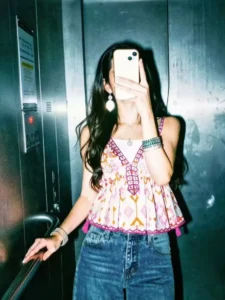
Apply a strong direct flash effect with high exposure and harsh lighting. Increase contrast and sharpness significantly. Add cool cyan/blue tones to shadows while keeping highlights slightly blown out. Skin tones should appear bright and slightly washed with a glossy flash look. Boost whites and reduce midtones for a punchy, high-fashion aesthetic. Add subtle noise and grain for a raw camera flash feel. Background should look darker and metallic with reflections enhanced. Overall look: paparazzi flash, night photography, bold, dramatic, Instagram restyle "flash" filter style.

Direct flash with controlled exposure, deep contrast and rich blacks, slightly crushed shadows. Cinematic teal shadows with warm orange highlights. Lower brightness, boost saturation and color depth. Skin warm, natural and glossy. High texture and sharpness with soft highlight glow. Add light grain and subtle vignette. Dark moody background, slightly desaturated with metallic reflections. Dramatic cinematic flash look, rich colors, Instagram flash + cinematic style.
How To Edit With Instagram Flash Filter AI Photo Editing Prompt
Technology changes fast, but the core workflow for using Gemini in 2026 remains streamlined:
- Export to Instagram: Once satisfied, download the high-resolution version or use the direct share button to post to Stories or Feed.
- Open the Gemini App: Navigate to the “Create & Edit” tab (introduced in Q1 2026).
- Upload Image: Select your raw photo. Avoid starting with a photo that already has heavy filters applied.
- Enter the Prompt: Paste one of the prompts above into the text input bar.
- Preview & Refine: Gemini will offer three variations. You can click on a variation and refine further with follow-up commands like “Make the grain darker” or “Brighten the eyes.”
Learn More: Google Gemini Rainy Photo Editing Prompts
Conclusion
The Instagram Flash Filter trend is more than just a passing fad; it represents a shift toward raw, candid aesthetics enhanced by intelligent tools. By using Google Gemini Instagram Flash Filter AI Photo Editing Prompt, you can easily create this type of photo. We discuss about how to create such a photo without using any photo editing software skills. Experiment with different prompts above and create a unique photo with some personal touch. Instagram Flash Filter AI Photo have already become trending, especially on Instagram. Here, we try to list all the viral Instagram Flash Filter AI Photo Editing nano banana prompts. If we miss any Gemini AI Instagram Flash Filter photo prompts, then let me know in the comment section. If that meets the quality standard, we definitely list it in the above Gemini AI Instagram Flash Filter photo prompt section.