Google Gemini God Hugging AI Photo Editing Prompts. If you’re currently scrolling through your Instagram reels, you’ve likely seen God Hugging AI Photo Editing circulating. A few days ago, a Ganapati Bappa-hugging AI video was trending on all social media platforms.
Hindu religious people love to share this kind of photo and video on various occasions, like Ganesh Chaturthi, Navaratri.
In this guide, I’ll explain each step, from using God Hugging AI Photo, complete with copy-and-paste prompts, tips, and our collection of Google Gemini God Hugging AI Photo Editing viral prompts.
Learn More: Ganapati bappa hugging AI video generator
Google Gemini God Hugging AI Photo Editing Prompts
Here we share some best prompts for photo editing with God.
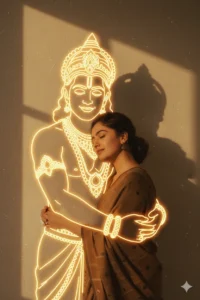
"Merge the two provided images-one of the girl and one of the God-so that it looks like both are hugging each other. The final composition should have a retro, vintage, grainy yet bright Pinterest aesthetic. Use a neon light for the appearance of god. The atmosphere should feel windy, dreamy, and blessed, as if God is lovingly giving blessings to the girl. The girl must look happy and smiling, wearing a Pinterest-style brown saree with a vintage effect. The God must also appear happy and smiling, radiating warmth and blessings Both are standing against a solid wall deep shadows and contrast drama, creating a mysterious and artistic atmosphere where the lighting is warm with a golden tones of evoking a sunset or golden hour glow. Make sure both of their eyes is closed. The background is minimalist and slightly textured the expression on her face is moody, calm yet happy and introspective."

"Merge the two provided images-one of the girl and one of the God-so that it looks like both are hugging each other. The final composition should have a retro, vintage, grainy yet bright Pinterest aesthetic. The atmosphere should feel windy, dreamy, and blessed, as if God is lovingly giving blessings to the girl. The girl must look happy and smiling, wearing a Pinterest-style brown saree with a vintage effect. God must also appear happy and smiling, radiating warmth and blessings. Both are standing against a solid wall, deep shadows and contrast drama, creating a mysterious and artistic atmosphere where the lighting is warm with golden tones of evoking a sunset or golden hour glow. Make sure both of their eyes are closed. The background is minimalist and slightly textured. The expression on her face is moody, calm, yet happy and introspective."

Merge the two provided images-one of the girl and one of the God-so that it looks like both are hugging each other. The final composition should have a modern Pinterest aesthetic. Use a blue neon light for the appearance of god.

The atmosphere should feel windy, dreamy, and blessed, as if the God is lovingly giving blessings to the girl.

The girl must look happy and smiling, wearing a Pinterest-style colorful saree with a vintage effect.

The God must also appear happy and smiling, radiating warmth and blessings Both are standing against a solid wall deep shadows and contrast drama, creating a mysterious and artistic atmosphere where the lighting is warm with a golden tones of evoking a sunset or golden hour glow. Make sure both of their eyes is closed. The background is minimalist and slightly textured the expression on her face is moody, calm yet happy and introspective.
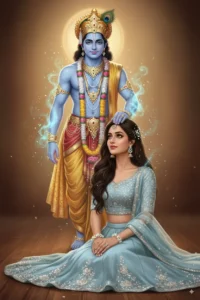
"Photorealistic digital painting of a young Indian woman, mid-20s, with long dark wavy hair, wearing a beautiful light blue lehenga with subtle embroidery and a matching choli. Must match the face with the uploaded woman. She is seated gracefully on the floor, looking upwards with a serene and loving expression. Her hands are gently folded in front of her, and she has small white floral bracelets on her wrists and a delicate floral hair accessory.

Behind her, partially transparent and glowing with an ethereal blue light, stands a depiction of Lord Krishna. He is shown with blue skin, wearing traditional elaborate attire, including a peacock feather in his crown, and adorned with intricate gold jewelry and floral garlands. His right hand is gently placed on the woman's head, as if bestowing a blessing or adorning her. There are subtle magical light particles emanating from Krishna and around the woman's head.

The background is simple and soft, a warm, diffused light creating a gentle halo effect behind Krishna. The overall mood is spiritual, devotional, and tender, with a high level of detail in the clothing, jewelry, and expressions. Studio lighting, dreamlike quality, highly detailed, artistic render."
How To Use Google Gemini God Hugging AI Photo Editing prompts?
Step 1: Copy the prompts from the above “Google Gemini God Hugging AI Photo Editing prompts” section.
Step 2: Now, go to the Gemini Ai app on your phone or visit the Gemini Ai image editor by clicking on the link below:
Create ImageStep 3: Then, sign up and log in to it, and enable the Gemini 2.5 Flash version to edit unlimited photos.
Step 3: Click on the tools and select the Create images option.
Step 5: Then, copy the prompts from the above and paste them into the Gemini 2.5 Flash text prompt box.
Step 4: Then, click on the + icon and upload a photo, which must be taken in good lighting conditions.
Step 6: Click on the Run button to generate the God Hugging AI Photo.
Step 8: After some time, your God Hugging AI Photo will be ready.
Step 9: Finally, click on the download button to save it.
Conclusion
By using the above Google Gemini God Hugging AI Photo Editing Prompts, you can create a realistic God Hugging AI Photo in just a few seconds. God Hugging AI Photo has now become viral, especially on Instagram. Here, we try to list all the viral Google Gemini God Hugging AI Photo Editing Prompts. If we miss any Google Gemini God Hugging AI Photo Editing Prompts, then let me know in the comments section. If that is up to the quality standard, then we definitely list it on the above Google Gemini God Hugging AI Photo Editing Prompts section.
Learn More: Gemini Retro Style Ai Boys Photo Editing